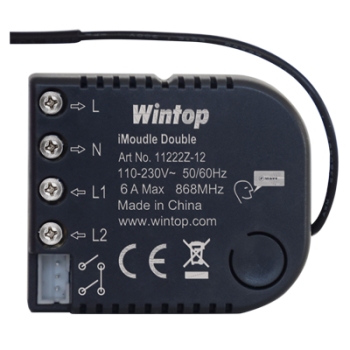
Goods Brief:
Attribute
Quick start
iModuleDouble
Product Number 11222R-12-S0084-P950Basic Operations
-The iModuleDouble can be remotely controlled.
-The iModuleDouble can be controlled by the push button on the front of the device.
-The iModuleDouble’s indicator light will indicate the status of the switch.
-The iModuleDouble can connect with your existing 2 Gang push button switch with ON / OFF function.Mounting
-Turn OFF power by switching off the circuit breaker or removing the fuse and test that power is off before wiring!
-Ensure iModuleDouble capacity matches the load requirements.
-Wall Installation: Connect it with your existing 2 Gang push button switch.
-Reapply power to the circuit at fuse box or circuit breaker to test the system carefully, if the indicator light on iModuleDouble blinks 30 seconds and then keep breathing, it means the installation is in good condition.
-Turn OFF the power again.
-For Wall Installation: Insert your push button switch together with iModuleDouble into switch box, being careful not to pinch or crush wires, and secure it with screws. Reapply power to the circuit at fuse box or circuit breaker.
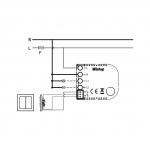
Wall Installation Wiring Diagram, connect with push button switch:
Please note: A 6A external fuse before the red wire Live of the iModuleDouble switch must be installed in the installation for protect the iModuleDouble switch overload. Red wire refers to Live IN, blue wire refers to Neutral, and black wire refers to connecting with switch.
Network Wide Inclusion
When the iModuleDouble is not yet included in a Z-Wave network, NWI will be started automatically for 30 seconds when the iModuleDouble is switching ON.
Make sure your Z-Wave controller is in the correct operating mode (inclusion).Normal include or exclude
Make sure your Z-Wave controller is in the right operation mode (include or exclude).
Press and hold the push button for 1 second and release to start the inclusion or exclusion process (indication mode: Ready for learn mode).Manual control
Connect the terminal block COM,KEY1,KEY2 with your existing 2 Gang push button switch, as per the wiring diagram.
Push the push button switch to control with ON / OFF function.Remote control
The iModuleDouble can be remote controlled by several Z-Wave controllers or devices.Indication modes
The indicator gives various statuses of the device as follows:
-Automatically add: blinks 30 seconds.
-Ready for learn mode: Indicator light breathing.
-Learn in progress (add): Indicator light blinks 1 time.
-Learn in progress (remove): Indicator light blinks 1 second (8 times).
-Learn mode success: Indicator light is on for 1 time. (and then if load is on, indicator light keep on; if load is off, indicator light keep breathing)
-Learn mode failed: Indicator light blinks fast.
Technical ManualCaution:
-This device is using a radio signal that passes through walls, windows and doors. The range is strongly influenced by local conditions such as large metal objects, house wiring, concrete, furniture, refrigerators, microwaves and similar items. On average, the indoor range is approximately 30 meters.
-Do not expose this product to excessive heat or moisture.
-Prevent long term exposure to direct sunlight.
-Do not attempt to repair this product. If the product is damaged or if you are in doubt about the proper operation, take the product back to the place of purchase.
-Do not clean the product with any liquid.
Normal operating voltage:AC
230V,50Hz
Maximum load
:6A
Frequency range
:868.42MHz
Wireless Range:Up to 30m line of sight
Storage temperature:-5° to 65°
Storage humidity:10% to 70%
Operating temperature:0° to 50°
Operating humidity:
30% to 80%
Design Features [无线协议] Z-Wave [无线频率] 868.42MHz EU [通讯距离] 室内30米(根据建筑物材质),室外100米 [电源输入] 230V AC 50Hz [负载类型] 白炽灯,卤素灯,荧光灯 [负载功率] Max 6A/路 [工作湿度] 30% to 80%